
Leadpages Review: Still Worth It or Overhyped?
January 24, 2026
Disclosure: This article contains affiliate links. If you click one and make a purchase, I may earn a commission at no extra cost to you. I only recommend products I’ve personally used or thoroughly researched. My opinions are my own.
Five years ago, recommending Leadpages was easy.
Affordable landing page builder. Dead-simple editor. Templates proven to convert. Perfect for beginners.
Today? That recommendation needs a fresh look.
WordPress plugins make beautiful pages easier than ever. AI generators work in seconds. Competitors offer more for less money.
And Leadpages?
Starts at $49/month for 5 landing pages. Pro is $99/month. Not exactly cheap anymore.
So the real question: Does Leadpages still deliver enough value? Or has it become overpriced hype?
I had the same question. Leadpages was my first landing page tool years ago. I’ve since moved to more robust funnel builders for my business.
But “what I remember” isn’t a review. So I went back and put it through its paces again.
I analyzed 500+ Leadpages reviews, especially the negative ones.
- “Clunky editor.”
- “Bad customer service.”
- “Too basic for the price.”
- “Refund problem”
I wanted to see what people actually complain about.
Then I went back into the platform and tested every complaint myself. Some complaints are valid. Some were already fixed. Some were never true.
This review combines that research, fresh testing, and years of landing page building experience.
Here’s what’s actually true in 2026.
Leadpages Pros and Cons
Before diving into the full Leadpages review, let’s cut to what matters: what’s actually good and bad about Leadpages?
I’m basing this on my hands-on testing, user reviews analyzed, and comparisons with alternatives like Landingi, Unbounce, Instapage, and ClickFunnels.
Pros
Cons
Leadpages gives you conversion-focused templates, built-in optimization guidance, and beginner-friendly tools that actually work. The limitations are customization, A/B testing on Standard, and the 5-page cap—matter less for beginners than they sound.
Where Leadpages falls short is in advanced flexibility. If you need pixel-perfect designs or enterprise features, Unbounce or Instapage might fit better (at 2-3x the price).
For most solopreneurs and small businesses? The pros outweigh the cons.
Quick Verdict: Is Leadpages Still Worth It?
Yes, but only for the right person.
Leadpages isn’t the cheapest option anymore. At $49/month, you’re paying more than for WordPress plugins, funnel builders, or modern AI tools.
So what does that money actually buy you?
Speed, simplicity, and guardrails that keep you from screwing up.
The templates are sorted by conversion rate – not just “pretty” or “popular.” Actual data. The Leadmeter scores your page in real-time and tells you exactly what to fix. No guessing. No “hope this works.”
For beginners, that’s HUGE. You’re not just building landing pages. You’re learning what makes pages convert while you build them. (Can’t put a price on that.)
“But only 5 pages for $49/month?”
I hear you. Sounds stingy.
But here’s the truth: Most small businesses don’t need 50 landing pages. They need 3-5 pages that actually convert. Leadpages focuses on making those pages work harder—not drowning you in unlimited mediocre ones.
Need more? Pro plan ($99/month) unlocks unlimited pages plus A/B testing.
The honest downside:
Customization is limited. If you want pixel-perfect control or complex designs, you’ll hit walls fast. Leadpages is built for “good enough that converts”—not for design perfectionists.
That trade-off works for most beginners. It might frustrate advanced users.
Bottom line:
Want professional pages without becoming a tech or web design expert? Leadpages earns its price.Not sure if it fits? They offer a 14-day free trial. Build a real page. Test the editor. You’ll know within a week.
Who Is Leadpages Good For?
Leadpages IS for you if:
Leadpages is NOT for you if:
What Is Leadpages?
Leadpages is a landing page builder designed to help small businesses create high-converting lead pages and sell products online. Founded in 2012 by Clay Collins, Leadpages is one of the oldest landing page builders still thriving—now serving over 466,000 customers worldwide.
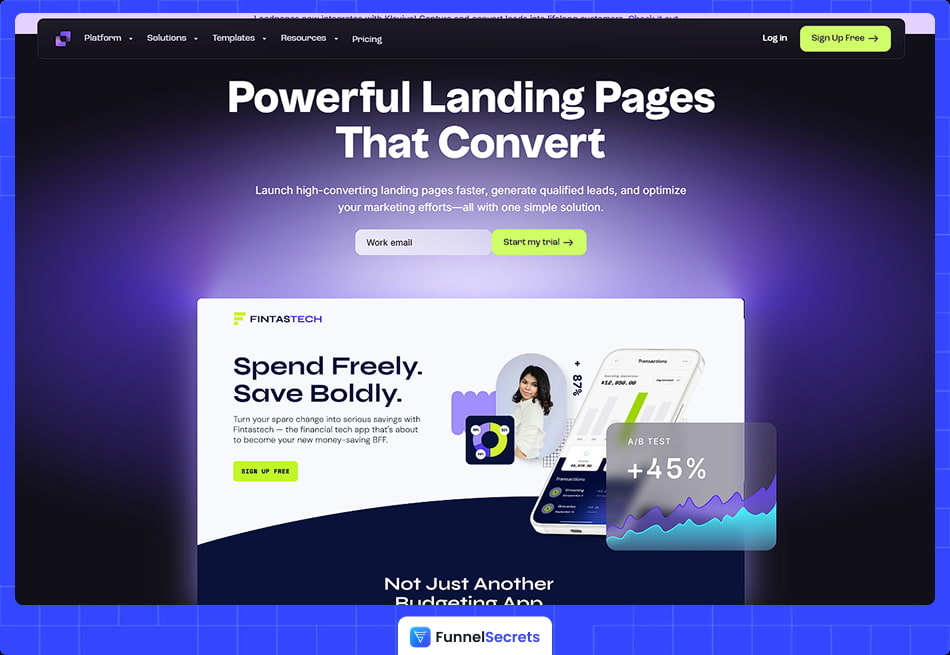
The core promise is simple: build professional landing pages without coding skills or design experience.
To deliver on that promise, Leadpages gives you:
- Landing pages: Drag-and-drop builder with 200+ templates for every goal: lead capture, webinar signups, product sales, and more.
- Conversion tools: Pop-ups, alert bars, and Leadmeter for real-time optimization feedback.
- Lead management: Built-in storage, spam filtering, and optional lead enrichment.
- Websites: Full website builder included. Blogging available on Pro plan and above.
- Checkout pages: Sell products and accept payments (Pro plan and above).
That said, Leadpages stays focused. It doesn’t build full sales funnels, membership sites, or online courses. If you need those, tools like ClickFunnels or Kajabi are better fits.
So, how does Leadpages stand out from other landing page builders?
Unlike competitors, which have outdated templates, no optimization guidance, and steep learning curves, Leadpages offers modern templates averaging 11.7% conversion rate (5x the industry average), built-in Leadmeter that coaches you as you build, and an editor simple enough to launch your first page today.
Less guessing. Faster results.
But don’t just take the marketing at face value. Here’s why I actually recommend Leadpages for small businesses after testing it myself.
5 Reasons I Recommend Leadpages For Small Businesses
1. Leadpages Super Easy To Use
Unlike other tools that bloat with features you’ll never touch and take weeks (even months) to master, Leadpages lets you build and publish a professional landing page in a single afternoon.
No coding required. Ever.
No design experience needed. Zero.
Even if you’ve never built a webpage in your life. (Yes, really.)
Here’s what you WON’T deal with:
- No more staring at a blank screen, wondering where to start
- No more Googling “how to create animated buttons” for 30 minutes
- No more waiting days for your web guy to make a tiny text change (and paying $50 for it)
Leadpages makes building landing pages faster in three ways:
First, Leadpages gives you 100+ pre-designed section templates you can drag and drop onto any page and auto-format them.
Pick from 15+ section types: Hero, Opt-in Form, Call to Action, FAQs, Plans/Pricing, Event, and more. They snap together like LEGO. You’re not designing a page. You’re assembling one. Most users finish their first page in under 15 minutes.

Drag-and-drop Editor: See your changes instantly. Move elements, resize images, and add new sections. What you see is what visitors get. No surprises. (I’ll explain it later)
Example, want to add a form to collect emails? Just grab the form and drop it where you want it. No computer coding is needed.

I built a complete lead magnet funnel: landing page plus thank you page, in about 2-3 hours. Your time may vary depending on your tech comfort level. But the section-based templates and clean navigation cut the learning curve DRAMATICALLY.
Sure, you COULD get the same result by spending 6 months learning WordPress, fighting with plugins, and hiring developers for every update.
Or you could launch this weekend with Leadpages.
Your call. (But we both know which one makes sense.)
Leadpages skips the struggle. You focus on marketing.
2. Templates That Look Pro and Actually Convert
Let’s address the elephant in the room.
Leadpages has gotten complaints about outdated templates for years.
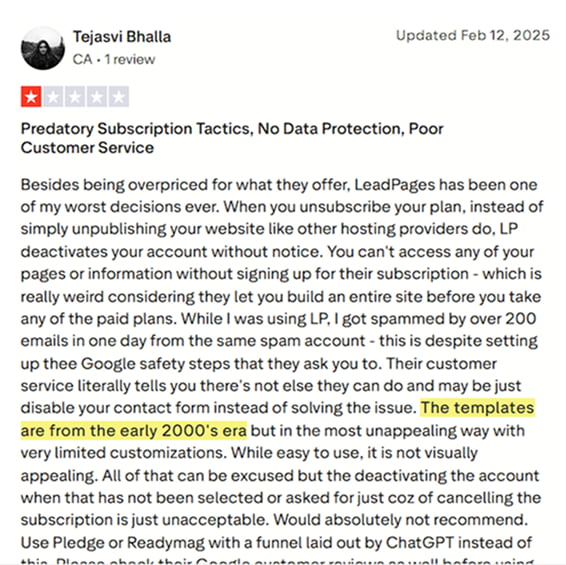
Fair criticism. But they’ve listened.
The current library is genuinely refreshed: clean, modern, and professional.

Here’s what most people don’t realize: modern doesn’t always mean better.
Right now, everyone’s obsessed with flashy animations, AI-generated designs, and “vibe coding” their landing pages. They look stunning on a desktop. But try loading them on mobile.
Slow. Broken. And conversion rates? Terrible.
On the flip side, other landing page builders try to beat Leadpages by offering MORE templates. Quantity over quality. Browse their libraries, and you’ll find designs that look like they’re stuck in 2005.
Leadpages hits the sweet spot: modern enough to build instant credibility, optimized enough to actually convert.
You get 250+ landing pages and website templates built on a decade of conversion expertise. Strategic CTA placement. Friction-minimizing layouts. Designs that guide visitors toward action, not just impress them.
The result? Leadpages users average over 11% conversion rates. (Industry average: 2-3%.)
You can filter templates by the highest-converting designs first, by industry, by style, or by color.
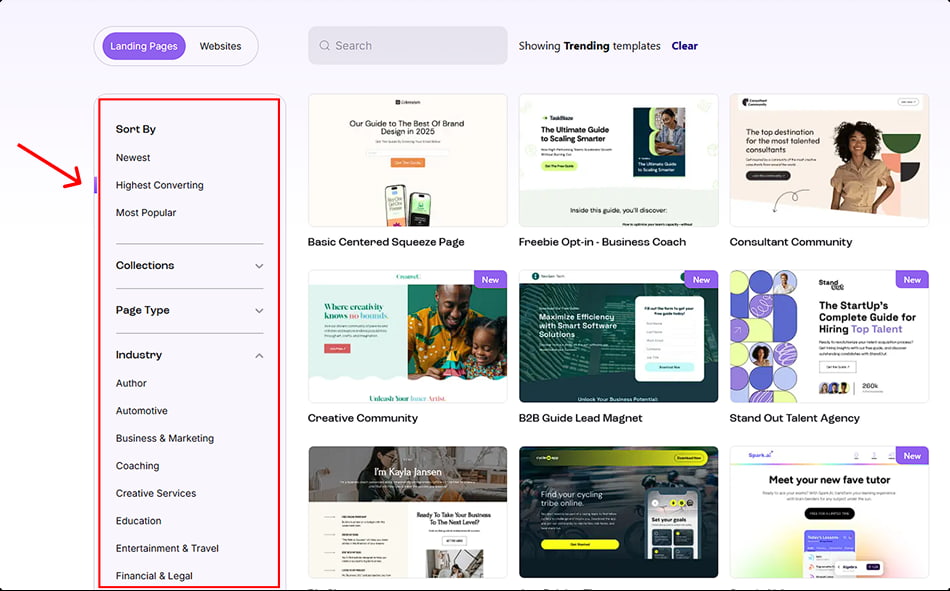
Find pages with documented performance results before you touch a single element.
Every template is mobile-responsive automatically. No manual adjustments. No broken layouts on phones. Just mobile-friendly designs that work across devices.
If your goal is to convert visitors into leads and sales, Leadpages templates are the starting point. And honestly? Unbeatable.
But don’t take my word for it. Leadpages publishes their entire template library on the website. Browse it yourself. See if the designs match your style. No signup required.
3. LeadMeter Takes the Guesswork Out of Building Pages That Convert
Leadmeter is Leadpages’ proprietary AI-powered conversion predictor that scores your landing page 0-100 based on 10 million+ data points. It analyzes headlines, CTAs, images, and form fields in real-time, providing specific suggestions to improve your score before publishing.
Ever publish a landing page, send traffic, and just… hope it works? Then watch your ad budget BLEED while conversions stay dead flat?
That gut-punch feeling ends with LeadMeter.
LeadMeter analyzes your page in real-time to help you make the right fixes BEFORE you burn a single dollar on ads.
It scans four critical areas:
- Page performance: Does it load lightning-fast and display flawlessly on mobile?
- Readability: Are your words easy to scan?
- Form friction: Is your form frictionless to fill out? (Fewer fields = more leads. Period.)
- Call-to-action strength: Do your buttons make people want to click?

For example, LeadMeter flagged my button text as hard to read (low contrast against the background). A mistake I would’ve totally missed. A silent conversion killer I would’ve blamed on “bad traffic” instead of my own page.

(Embarrassing? Yes. But LeadMeter caught it before anyone else saw.)
Here’s the thing: Leadpages didn’t guess what works. They analyzed 10,000+ REAL landing pages to crack the code on what actually converts. Every single suggestion is backed by hard data. Not theory. Not hunches. Not some guru’s opinion.
This is absolute gold for beginners.
If you’re a startup or solopreneur with zero lead generation experience, LeadMeter is your secret weapon. It catches the rookie mistakes that SILENTLY murder your conversion rates—vague headlines, buried buttons, bloated forms, images that load like it’s dial-up 2005.
You won’t just build pages. You’ll build pages with confidence, knowing the fundamentals are locked in tight before your first visitor even lands.
Does LeadMeter guarantee sky-high conversions? No.
Nothing can promise that. (Run from anyone who does.)
But it guarantees you won’t sabotage yourself with avoidable mistakes.
- No more publishing and praying.
- No more burning ad budget on broken pages.
- No more staring at analytics, wondering “why the hell isn’t this working?”
You become the marketer who launches with confidence, not crossed fingers and cold sweats.
4. The AI Writing Assistant Kills Blank Page Syndrome
Your headline has 3 seconds to hook visitors.
The problem is, writing copy that converts is genuinely hard. Landing pages need to hook, persuade, and drive action – all in a few words. Professional copywriters charge $500+ per page for a reason.
Most DIY marketers freeze here. Typing. Deleting. Typing again. Two hours later? Still no published page.
Leadpages built an AI writing assistant directly into the editor.

Now, you might already use ChatGPT or Claude for writing. Great tools. More flexible, honestly.
But here’s the thing: flexibility creates friction.
General-purpose AI needs you to explain everything. Your audience. Your offer. Your tone. The format you want. You’re writing prompts, refining prompts, then copying output into your page builder.
That’s work.
When you use Leadpages’ AI, it takes the thinking out of the equation. It already knows you’re building a landing page. It sees your existing copy. It understands the context.
You just:
- Highlight text
- Click “Rewrite” or “Expand”
- Pick your favorite
- Keep building
No prompt engineering. No tab switching. No breaking your flow.
What the AI handles:
- Headlines: 5 variations instantly—test which hooks best
- Calls to Action: Turn “Submit” into buttons people click
- Summaries: Condense rambling copy into punchy lines
- Expand: Flesh out thin bullet points
- Rewrite: Fresh angle, same message
Add a tone (optional): professional, friendly, urgent, playful. The AI adjusts its word choices accordingly.

Before generating, you’ll see a credit estimate. No surprises.
Credit breakdown:
- Standard plan: Headline Swap only
- Pro plan: 30,000 credits/month (full Writing Assistant)
- Advanced plan: 100,000 credits/month
- Credits replenish on the 1st of each month
Will it write perfect copy? No. But it gives you momentum. Starting points. Options.
No more blank page paralysis. No more 2-hour headline sessions.
Leadpages also uses the AI Engine to generate images. Describe what you need, get custom visuals without leaving the editor. No stock photo hunting. No designer fees.

Highlight. Generate. Pick. Publish.
5. It Works WITH Your Tools (Not Against Them)
“But Leadpages doesn’t have email marketing or CRM built-in…”
Exactly. That’s the point.
Leadpages does one thing: They’ve spent 12+ years obsessing over this single problem. That focus shows.
Why “all-in-one” often backfires:
Those platforms promising everything sound great at first. Email marketing! CRM! Landing pages! Courses! Memberships! All in one place!
Then you grow. Reality hits.
The email tool isn’t as powerful as ActiveCampaign. The CRM can’t match Keap. The sales features lag behind Salesforce. Your favorite tools don’t integrate.
You’re stuck with “good enough” across the board instead of excellent where it matters.
I’ve been in this industry for over a decade. I’ve watched powerful software get acquired by bigger companies. Development slows. Innovation stops. The product you loved becomes a shell of itself.
And migrating out? Nightmare. Blogs, email sequences, leads, sales pipelines, orders, pages, funnels—all tangled together. Your business stops while you sort it out.
Leadpages built a safety net for this:
Every opt-in is stored in your Leads Library. Email tool goes down? Leadpages holds the data and auto-forwards once the service returns. No lost leads. No manual uploads. No panic.
Provider shuts down completely? Your leads are safe. Swap the integration. Keep moving.
Even if something happens to Leadpages itself? Switch page builders. Your email sequences, CRM, and sales tools stay untouched.
For small businesses, this flexibility is everything.
You’re not betting your entire operation on one platform. You’re building a stack where each tool earns its place—and can be replaced if something better comes along.
Modular beats monolithic. Especially when you’re small and need to stay nimble.
3 Fair Criticisms of the Leadpages
You’ve read the good stuff. Now you’re probably thinking: “Okay, what’s the catch?”
Fair question. Every tool has trade-offs.
I dug through hundreds of negative reviews and tested these complaints myself. Some were outdated. Some were overblown. But these three? Legitimate.
1. Leadpages Is No Longer the “Affordable” Option
Most reviewers still position Leadpages as the budget-friendly landing page builder.
I disagree.
On the surface, the math looks good. Leadpages starts at $49/month. Unbounce? $99/month. Instapage? $99/month. ClickFunnels? $97/month.
Leadpages is 2x cheaper than direct competitors. Sounds like a win.
But here’s what that comparison misses:
Zoom out.
Systeme.io offers landing pages, email marketing, funnels, and more starting at $17/month. GetResponse bundles landing pages with email automation for $19/month. Both include features Leadpages charges extra for.
So you’re paying $49/month for a tool that ONLY builds landing pages. It’s quite a premium compared to bundled alternatives. Meanwhile, $17-19/month gets you landing pages PLUS email marketing, automation, and funnels.
For small business owners watching every dollar? Tough to justify.
Leadpages delivers quality. The templates convert. The editor works smoothly. You’re paying for a focused tool that does one thing well—without overwhelming you with features you’ll never touch.
But “affordable”? Not anymore. The market has moved.
My take:
If budget is your primary concern, explore alternatives first. (I cover options in my best sales funnel builder software guide.)
If you value simplicity, proven templates, and a platform that stays out of your way—Leadpages may be worth the premium.
Just know what you’re buying. This isn’t the cheap option. It’s the focused one.
And speaking of costs, the free trial has its own catches…
2. The Free Trial Sets You Up to Guess
Leadpages offers a 14-day free trial. Sounds generous.
Here’s what they don’t tell you upfront:
You can’t publish landing pages during the trial.

You’re stuck previewing. Can’t test real load speeds. Can’t see how pages perform on actual devices. Can’t collect real leads to verify the workflow.
It’s like test-driving a car but only in the parking lot.
The AI features? Also limited.
You get 3,000 credits. Sounds like plenty, until you try AI image generation. One image costs 2,000 credits. Generate one image, tweak a few headlines, and you’re tapped out.

I hit this wall myself. Wasn’t happy with an AI result, wanted to try again. No credits left. Only option? End trial and pay.

Other key features are locked too:
- A/B testing: Can’t verify which headlines actually convert
- Lead magnets: Can’t test your complete opt-in workflow
- Live publishing: Can’t see real-world performance
Compare this to ClickFunnels or Unbounce. Their trials let you publish pages, collect leads, and even make sales before paying a cent.
Leadpages’ trial feels more like a demo than a true test drive.
💡 Pro tip: Focus your trial on the editor and templates (that’s where you’ll learn the most). Skip AI image generation (burns credits fast). Test the building experience, not the publishing features you can’t access anyway.
Leadpages is solid once you pay. But going in blind on a $49-99/month commitment? That’s what the trial forces you to do.
3. The Editor Has Bugs (Sometimes) and Design Gaps
I hit bugs building in Safari.
The Leadmeter? Clicked it. Nothing happened.
The “Add Image” button? Kept hiding behind other elements. Had to hunt for it every time.

Switched to Chrome. Problems disappeared. But I shouldn’t have to switch browsers to finish a landing page.
The design limitations frustrated me more.
I wanted a gradient text effect for my headline (something you see on most modern landing pages). Leadpages can’t do it. Tried adding a quick quiz to boost engagement. No quiz widget. Wanted different font sizes for mobile vs desktop. Not possible.
Features Leadpages is missing:
- Text effects (gradients, shadows)
- Interactive widgets (quizzes, surveys)
- Granular spacing controls
- Responsive typography options
It’s like painting with only three colors. You can create something—but it won’t match what you imagined.
Here’s who this affects:
Building a simple opt-in page? You won’t notice these limits.
Building a sales page that needs to compete with modern websites? You’ll feel every gap. Workarounds exist, but they eat time.
Leadpages is built for speed and simplicity, not pixel-perfect customization. If design control matters to you, check the alternatives below before committing.
Inside the Leadpages Editor: A Hands-On Walkthrough
I’m skipping the feature-by-feature breakdown. You can read that on Leadpages’ website. (Spoiler: it’s boring.)
Instead, I’ll walk you through building your first landing page. From signup to publish. Every step. Every screen. The smooth parts and the parts that made me want to throw my laptop.
By the end, you’ll know exactly what using Leadpages FEELS like before spending a dollar.
Grab some coffee. Let’s build something.
1. The Onboarding: Quick Setup, Disappointing Template
After signing up, Leadpages drops you into a short quiz.
How will you use the platform? Running paid ads? Growing organic traffic? Selling products?
Your answer shapes what happens next.

I selected “run paid ads.” If you pick “sell products,” you’ll set up Stripe payments right away. Not ready for that? Skip straight to the dashboard. No pressure.
Next up: company name, logo, brand style (Professional, Minimal, Elegant, or Bold), and colors.


Pro tip: Stuck on colors? Happens to everyone. Use Website Stylekit or UI Color App to generate a palette in 30 seconds flat.
Finally, name your page. Hit continue. Leadpages generates a template based on your inputs.

And here’s where my excitement died.
The template looks like it time-traveled from 2018.

Generic layout. Dated fonts. Stock photo energy. I wouldn’t publish it. Wouldn’t even try to salvage it.
But wait. One thing caught my eye.
The layout uses labeled sections: Header, Hero, Problem, Solution, About, and How It Works. Each block is clearly named.

Think of it as a landing page blueprint. The design is weak, but the structure teaches you how high-converting pages actually flow. (Useful if you’ve never built one before.)
💡 My recommendation: Skip the generated template entirely. Head straight to the template library. You’ll find better options in 30 seconds. Trust me on this one.
2. The Dashboard: Clean, Simple, Zero Overwhelm
First login. Deep breath. Here’s what you see:

- Right side: page views, unique visitors, conversions. (My screenshot shows zeros. I captured this fresh out of signup. Don’t judge.)
- Left side: navigation to pages, pop-ups, alert bars, and leads.
No clutter. No feature dump. No “WHERE DO I EVEN START?” panic.
Everything sits exactly where you’d expect it. The navigation feels instinctive.
For new users, the “Jumpstart your success” section walks you through the basics without being annoying about it.

Click “Get to know builder” and a short video explains the editor, customization options, and integrations.

Revolutionary? Nope. But Leadpages earns points for not making your first experience feel like defusing a bomb.
You can actually START instead of watching 47 tutorial videos first.
3. Lead Magnets: The Feature Most People Skip (Big Mistake)
Most people rush straight to building pages.
Slow down. Set up Lead Magnets first.
This feature stores and automatically delivers your free offers (ebooks, PDFs, checklists, templates) to subscribers the moment they opt in.

“So what? I can just use Google Drive links.”
Oh, sweet summer child. Let me tell you a horror story.
Before discovering this feature, I shared lead magnets through Google Drive and Dropbox. Seemed fine. Easy. Free.
Then I found my “exclusive” PDF floating around Facebook groups. Shared in forums. Forwarded in emails. Hundreds of people accessing my content without ever subscribing.
My carefully crafted lead magnet? Basically, the public domain at that point.
Leadpages fixes this completely.
They host your files securely and deliver them automatically the moment someone opts in. No public links floating around Facebook groups. No strangers downloading your “exclusive” content without subscribing.
Your lead magnet stays yours. Your email list actually grows. And you stop giving away free stuff to people who never intended to hear from you again.

No manual file delivery. No broken links. No 3 am panic when you realize your Dropbox link expired mid-launch.
NOTE: Lead Magnets require a paid account. You can’t test this during the free trial.

If automatic delivery matters to your funnel (and it should), factor this into your trial evaluation. You won’t experience it until you pay.
4. Building a Landing Page: Start With Templates or Regret It Later
Here’s rule number one: Start with a template. Always.
“But I want to build from scratch! Express my creativity!”
I admire the enthusiasm. But unless you’ve studied landing page design for years, you’ll build something that looks “fine” but converts like garbage.
Templates exist for a reason. Use them.
The template library is organized by use case:
- Webinars
- Ebooks
- Product launches
- Coming soon pages
- and thank you pages.

But here’s what makes Leadpages different from every other builder I’ve tested:
Templates are sorted by conversion rate.
Let that sink in.
You can literally filter by “highest converting” and see which templates have generated the most leads for other businesses. Not which ones look prettiest. Not which ones the design team liked best. Which ones ACTUALLY PERFORM.
This matters more than most people realize.
I’ve seen gorgeous custom pages convert at 0.5%. I’ve seen “boring” template pages hit 8%. Pretty doesn’t pay the bills. Conversions do.
With Leadpages, you’re not guessing. You’re not copying some random competitor and hoping for the best. You’re starting with proven winners.
Pick a high-converting template. Customize the copy. Launch.
Skip three months of “why isn’t my beautiful page converting?” frustration. (Been there. Hated it. Don’t recommend.)
Once you pick a template, customize Page Styles first.

Brand colors. Button styles. Fonts. Favicon. Get this foundation right before touching anything else.
Why? Because changing these later means updating every. single. element. individually. (Ask me how I know. Actually, don’t. Still traumatized.)
The Page Layout view shows your structure clearly.

First thing I do: rename sections immediately.
- “Section 1” becomes “Hero Banner.”
- “Section 2” becomes “Social Proof.”
- “Section 5” becomes “Final CTA.”
Sounds small. Saves massive headaches later. Especially when your copywriter asks “where’s the testimonial section?” and you’re not scrolling through fifteen unnamed blocks.
Now, the drag-and-drop editor itself.

Functional. Intuitive for basic edits. Templates are customisable enough for most needs. You’ll figure it out in ten minutes.
But less flexible than competitors like Unbounce or Instapage. You’ll occasionally want a widget that doesn’t exist. Or spacing controls that aren’t available.
(I covered these limitations in my criticisms section. They’re real. Don’t let anyone tell you otherwise.)
Here’s a feature I didn’t expect to love this much: real-time collaboration.

Add your copywriter. Designer. Marketing lead. VA. That one stakeholder who always has “just one small change.” Everyone edits the same page simultaneously.
If you’ve ever managed a landing page project through email, you know the pain I’m talking about.
- “Here’s V1, let me know your thoughts.”
- “Attached is V2 with Sarah’s feedback.”
- “V3 FINAL.”
- “V3 FINAL revised.”
- “V3 FINAL revised ACTUALLY FINAL USE THIS ONE.” 😂
Then someone replies to the wrong email thread with feedback on V1. And your designer is working from V2. And somehow the live page has a typo nobody caught because everyone was looking at different versions.
Ask me how I know. (Actually, don’t. The therapy bills were expensive.)
With Leadpages, everyone works on the same page. Same version. Same time. Changes sync instantly.
Pages that used to take weeks? Done in days. You launch faster. Collect leads sooner. And nobody threatens to quit over version control.
5. Pop-ups and Alert Bars: Free Conversion Boosters on Every Plan
Here’s where Leadpages quietly delivers MASSIVE value that most reviews skip entirely.
Pop-ups (Leadboxes) and Alert Bars come with every plan. Even Standard. Unlimited.
Most landing page builders charge extra for these. Or limit how many you can create. Or lock them behind expensive tiers.
Leadpages? Nope. Build as many as you want. No upgrade required.
Let’s break down what you get.
Pop-ups (Leadboxes)
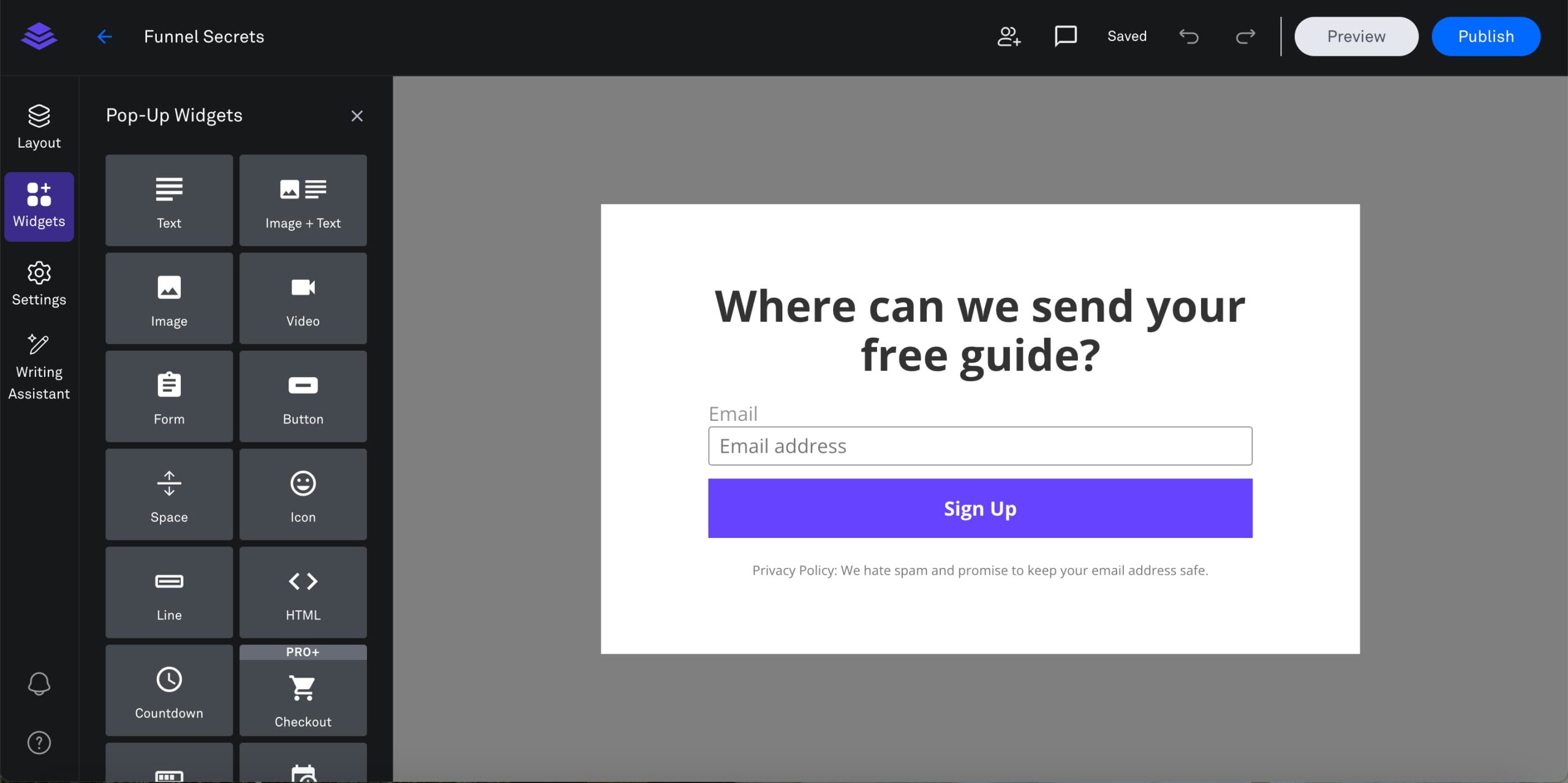
Create exit-intent pop-ups, timed pop-ups, click-triggered pop-ups, or scroll-based pop-ups. The editor works exactly like the landing page builder. Same drag-and-drop interface. Same widgets. No learning curve.
Trigger options include:
- Exit intent: Cursor moves toward browser close? BAM. Last-chance offer appears.
- Time delay: Appears after X seconds on page.
- Click trigger: Visitor clicks a button or link to open it.
- Scroll percentage: Appears after scrolling 50% (or whatever you set).
I use exit-intent pop-ups on every landing page I build. My pages feel naked without them. (Okay, that sounded weird. Moving on.)
Here’s why they matter:
Picture this. Someone lands on your page. Scrolls a bit. Reads your headline. Gets distracted by a text from their mom. Moves their cursor toward the close button.
Without a pop-up? Gone. Forever. You’ll never see them again. They’ll forget you existed by the time they finish responding to mom’s emoji-filled message about dinner plans.
With an exit pop-up? “Wait! Before you go, here’s 10% off.” Or “Grab this free checklist.” Or “Did you see our guarantee?”
Suddenly, they’re typing their email instead of bouncing.
The numbers don’t lie: a well-timed exit pop-up recovers 5-10% of abandoning visitors. These are people who were GONE. Vanished. Now they’re on your list.
Same traffic. Same ad spend. More leads.
That’s not a feature. That’s a rescue mission for revenue you were about to lose.
Alert Bars
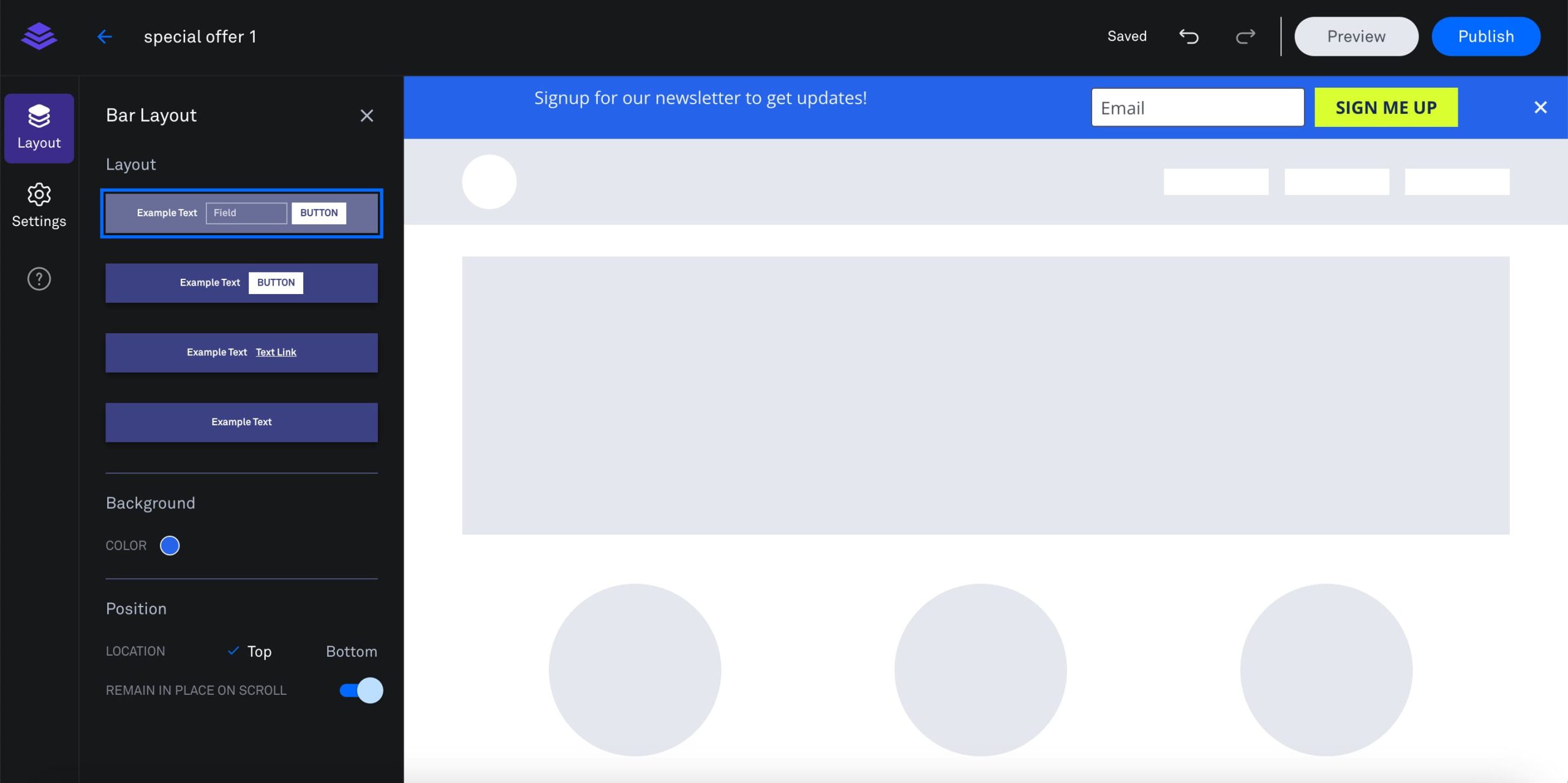
Alert bars are the thin banners at the top or bottom of your page. You’ve seen them everywhere.
- “🔥 Sale ends tonight!”
- “Free webinar Thursday. Save your spot.”
- “Hey, we use cookies. Shocking, right?”
Setup takes two minutes. Pick a color. Write your message. Add a button. Done.
Nothing revolutionary here. But these little bars WORK.
They catch attention without being annoying. Unlike pop-ups, which some visitors hate with a burning passion usually reserved for slow WiFi and people who reply-all unnecessarily.
Use alert bars for flash sales, webinar promos, or important announcements. Subtle. Effective. Included on every plan.
💡 Pro tip: Restraint is key. One pop-up per page. One alert bar max. Stack multiple pop-ups and you’ll annoy visitors into leaving faster than they would have anyway. Nobody likes feeling trapped in a pop-up nightmare. Nobody.
6. Optimize For Mobile Device
Leadpages handles basic responsiveness automatically. Given that over half your visitors come from mobile traffic, this matters. Text stays readable. Buttons stay tappable. Forms work. Your page won’t look like scrambled eggs on mobile.
Preview your page on phone and tablet using the device icons in the editor.

So far, so good.
But here’s where I got frustrated.
You can’t set different font sizes for mobile vs desktop.
Want your headline at 48px on desktop but 32px on mobile? Too bad. Can’t do it with one element.
“Wait, seriously? That seems basic.”
I know. I KNOW.
The workaround: Create two text blocks. Set one visible on the desktop only. Set the other visible on mobile only. Duplicate your content across both.
It works. But it’s clunky. Makes pages harder to edit later. Every headline change means updating TWO elements instead of one.
For simple opt-in pages, you won’t notice this limitation.
For sales pages with precise typography requirements? Budget extra time for workarounds. And maybe some stress snacks.
💡 Pro tip: Preview on your ACTUAL phone before publishing. Not just the editor preview. Real device. Real browser. You’ll catch issues the simulator completely misses. I’ve saved myself embarrassing launches more than once this way.
7. Optimize For SEO and Publish
Leadpages covers the standard SEO settings:
- Page title
- Meta description
- Social sharing image (Open Graph)

I especially like previewing how the page appears in social feeds BEFORE publishing.

No more posting your new landing page on Facebook and discovering the preview image is cropped weird, the title got cut off, and it looks like amateur hour.
You see exactly what people will see. Fix it before anyone else does.
Tracking integration is straightforward.
Connect your analytics tools by dropping in your Google Analytics ID andFacebook Pixel. Both fields are clearly labeled. No hunting through settings menus.

Set this up BEFORE launching. Seriously. Nothing worse than running $500 in ads to a page and realizing you forgot tracking.
One useful feature: widget language settings.

Translate non-editable text (countdown timers, progress bars, form labels) into different languages. Helpful for international audiences without hiring a developer.
What you WON’T find:
Custom schema markup. Advanced technical SEO options. Canonical URL controls.
Leadpages covers the basics. Enough for landing pages. Not enough for enterprise SEO teams with 47-point checklists.
Publishing options:
- Leadpages subdomain (free, but screams “I’m not serious about my business”)
- Your own domain (recommended, looks professional)
- WordPress integration (plugin makes it easy)

I always publish to my own domain. Setup takes five minutes. And “yourbrand.com/free-guide” converts better than “yourname.leadpages.co/free-guide-final-v3” anyway.
💡 Pro tip: Keep meta descriptions under 155 characters. Leadpages lets you write longer, but Google chops them off. Especially on mobile. Write tight or get truncated.
8. Create A/B Split Test
Here’s where things get exciting.
(Okay, “exciting” if you’re a conversion nerd like me. Otherwise, “useful.”)
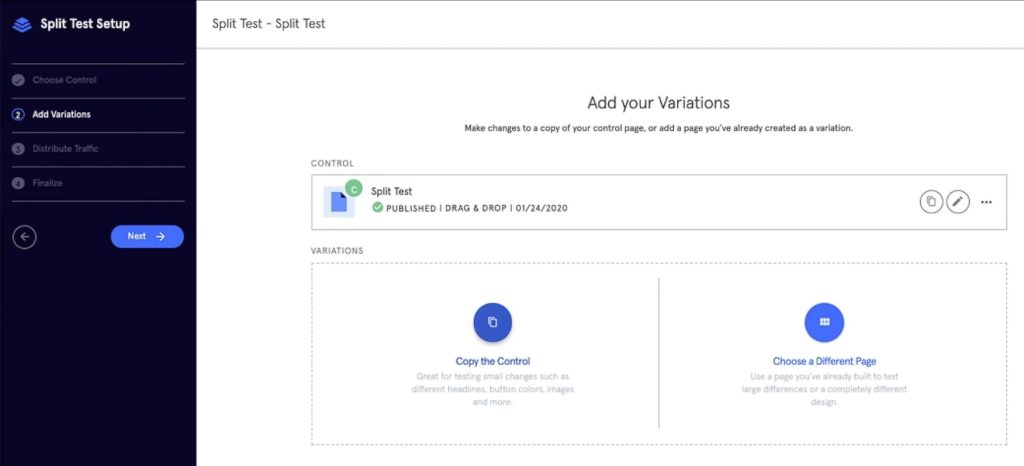
A/B testing lets you pit two page versions against each other. Different headlines. Different button colors. Different hero images. Different layouts entirely.
Leadpages splits traffic automatically. Tracks which version converts better. Declares a winner.
You stop guessing. Start knowing. And your pages show better performance over time.
Two testing options:
Option 1: Copy the Control
Duplicate your existing page. Make ONE small change. Test.
Perfect for:
- Headline tests (“Get Your Free Guide” vs “Download Now”)
- Button color experiments (green vs orange)
- Adding a single testimonial
- Tweaking your CTA copy
Small changes. Sometimes massive results.
Option 2: Choose a Different Page
Test completely different designs against each other.
Minimal layout vs image-heavy. Short-form vs long-form. Video header vs static image.
Find out what your specific audience actually responds to. Not what some “best practices” blog post told you.
Let me tell you about the headline that changed how I think about landing pages.
I had a client page converting at 2.1%. Decent. Not great. We couldn’t figure out why it wasn’t hitting 4-5% like our other pages.
I set up an A/B test. Same page. Same design. Same offer. Just changed the headline.
Original: “Get Your Free Marketing Guide”
Variation: “The 5 Mistakes Killing Your Facebook Ads (Free Guide)”
Same promise. Different angle.
Two weeks later? Version B converted at 4.8%. More than double.
One headline. Same traffic. Twice the leads.
That’s what A/B testing does. You stop guessing which headline works better. You test it. You stop assuming green buttons outperform orange ones. You know for sure.
Every test teaches you something about YOUR specific audience. Not generic “best practices” from some blog post written in 2019. Real data from real visitors on your actual page.
Once you experience that first “holy crap, version B crushed it” moment, you’ll test everything. I certainly do.
The catch: A/B testing is locked to Pro plan ($99/mo) and above. Standard users don’t get access.
Worth upgrading for? If you’re serious about conversions, absolutely.
Leadpages Integrations: Solid Basics, Expensive Surprises
Leadpages advertises “40+ integrations.” The integration options sound impressive until you look closer.

Leadpages connects natively with 13 tools (no middleman needed):
That’s the complete list.
To integrate Leadpages with everything else, you’ll need Zapier.
Free plan handles basics. But Webhooks or multi-step automations? That’s$20/month extra. $240/year just to connect your tools.

Here’s what really surprised me.
Want HubSpot, Salesforce, or Marketo integration? No upgrade button. No public pricing. Just “contact sales.”
In my experience, “contact sales” means “prepare to flinch.” Companies hide prices when they know you won’t like them.
Who this affects: Simple stack (landing pages + email tool)? You’re covered. Native integrations work great. Already using enterprise CRMs? Get a pricing quote BEFORE committing. Don’t assume your tools connect easily.
Leadpages is built for small businesses with simple setups. The “contact sales” barrier tells you exactly who it’s NOT built for.
Leadpages Pricing: What You’ll Actually Pay
Leadpages offers three plans: Standard, Pro, and Custom. The landing page builder pricing ranges from $37 to $99 per month when billed annually. Monthly billing costs more.
| Plan | Monthly Price | Annual Price | Core Features |
|---|---|---|---|
| Standard | $49/month | $37/month | 5 landing pages, 1 custom domain, standard integrations |
| Pro | $99/month | $74/month | Unlimited landing pages, A/B split testing, payment processing |
| Custom | Contact Sales | Contact Sales | Client sub-accounts, HubSpot/Salesforce integrations |
Optional Add-ons:
- Additional user: $15/mo per user
- Lead Enrichment: $15/mo (includes 40 enriched leads monthly)
Standard handles basic lead generation. Five pages. No split testing. Best for solopreneurs testing the platform.
Pro unlocks conversion optimization: unlimited A/B tests, Stripe payments, blog monetization. Most small businesses need this tier.
The Hidden Cost: Leadpages Is a Standalone Tool
Leadpages builds landing pages. That’s it.
To complete your sales funnel, budget for additional software: email marketing tools (ConvertKit, ActiveCampaign, Mailchimp), CRM systems (HubSpot, Salesforce), or webinar platforms. These subscriptions add $20 to $100+ monthly.
Refund Policy: 14-Day Trial + 7-Day Guarantee after your first charge.
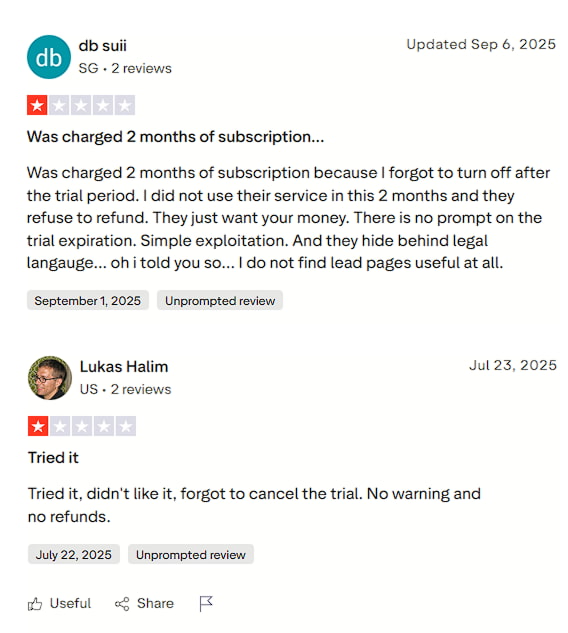
I’ve seen angry reviews calling Leadpages a “scam” over refunds. The pattern? User forgets to cancel, gets charged two months later, demands money back, gets denied.
Every SaaS works this way. Netflix. Spotify. Canva. All of them. Forget to cancel for months, then expect a refund? That’s not how subscriptions work.
Protect yourself: Set a calendar reminder on day 12. Cancel before the trial ends if you’re unsure. Don’t blame the company for your forgotten subscription.
Leadpages isn’t predatory. They’re standard. Just be proactive.
Final Verdict: Should You Try Leadpages?
Yes, if you’re a beginner, solopreneur, or small business owner who wants landing pages that convert without the tech headaches.
Here’s what you’re getting: 250+ templates averaging 11.7% conversion rates (5x industry average). LeadMeter that coaches you in real-time. An AI Writing Assistant that kills blank page syndrome. And an editor simple enough to build a complete funnel in 2-3 hours.
Is it the cheapest option? No. At $49/month, budget alternatives exist.
Is it the most powerful? No. Design perfectionists will hit walls.
But for most small businesses? Leadpages hits the sweet spot: simple enough to launch fast, optimized enough to actually convert.
You’re not paying for features you’ll never use. You’re paying for a decade of conversion expertise baked into every template.
Ready to see for yourself?
👉 Start your 14-day free trial here
Need something cheaper, more powerful, or different? No problem. Options exist.
Where Does Leadpages Fit in Your Sales Funnel Stack?
Leadpages is a landing page builder. It captures leads. That’s its job. And it crushes it.
But lead capture is just ONE stage of your sales funnel.
You still need email marketing to nurture subscribers, checkout pages to process payments, and marketing automation to connect everything. Leadpages doesn’t handle those natively.
Two paths forward:
- Build a modular stack: Leadpages + email tool + payment processor. Flexible, but you’re juggling multiple subscriptions.
- Use all-in-one sales funnel software: Landing pages, emails, checkouts—connected from day one. Less flexibility, way fewer headaches.
Collecting leads only? Leadpages is plenty.
Selling products with upsells and automation? A dedicated funnel builder fits better.
Not sure which approach matches your business? I break down the top sales funnel software (features, pricing, and ideal use cases).
Leadpages Alternatives
Leadpages is NOT your only choice.
Your needs might not match what Leadpages offers. The $49/month Standard plan hits hard when you’re bootstrapping. Some marketers need complete sales funnels, not standalone opt-in pages. Others want built-in marketing automation or advanced A/B testing.
I’ve been down this road. Tested more tools than I’d like to admit. Some were brilliant. Some were painful. A few made me want to throw my laptop out the window. Below are 4 alternatives that actually held up.
Quick overviews enough to know if they deserve a closer look. For the deep dive with side-by-side comparisons, I break it all down in my Leadpages alternatives.
1. Landingi
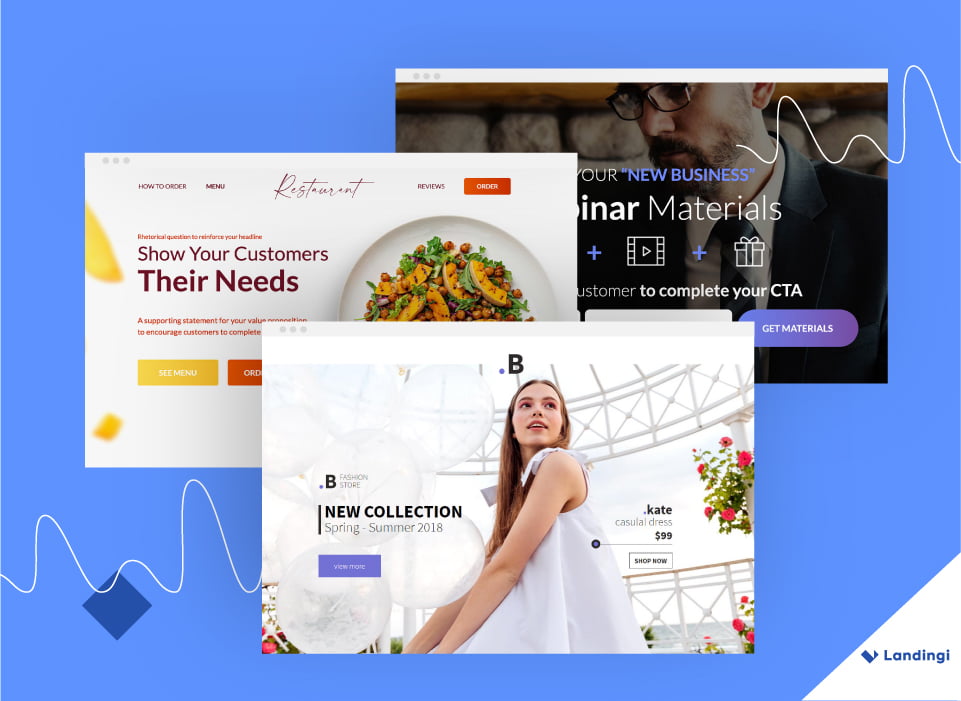
Landingi is a budget landing page builder starting at $29/month with 10 pages, 400+ templates, 5000 visits per month, and AI Assistant included.
Unlike Leadpages, this lower-cost option is perfect for bootstrappers who’d rather spend $29/month on unlimited pages than $49/month for just five.
Landingi covers the basics: drag-and-drop editor, integrations with major email tools, and enough templates to get started quickly.
But don’t expect the same polish. Pages load noticeably slower than Leadpages. Basic features like hamburger menus and lazy loading? Missing. The mobile editor is frustrating too: you can’t fully control side padding, leaving awkward spaces on the edges, no matter how you adjust.
Overall, Landingi is a solid budget pick if you can live with slower performance and mobile limitations. Just don’t expect the speed and refinement Leadpages delivers out of the box.
Want more power instead of a lower price? Unbounce enters the chat.
2. Unbounce

Unbounce is a premium landing page builder with pixel-perfect customization, AI-powered optimization, and advanced A/B testing—starting at $99/month.
Unlike Leadpages, this power-user approach is perfect for agencies and seasoned marketers who need granular control over every shadow, spacing, and conversion element.
Unbounce gives you serious firepower: dynamic text replacement that matches headlines to search queries, smart traffic routing powered by AI, and targeting options for popups that Leadpages can’t touch. For teams running high-budget campaigns? This is the pro toolkit.
But don’t expect a smooth ride if you’re a beginner. The editor has a steeper learning curve. Features clutter the interface. And that $99/month? It climbs fast once you need more traffic or conversions. (Your wallet will feel it.)
Overall, Unbounce is built for marketers who’ve outgrown simple tools and need advanced control. But for most small businesses who just want pages up fast? It’s more horsepower than you’ll ever use. You’re paying double for complexity you don’t need.
I’ve compared these two head-to-head in my Leadpages vs Unbounce review. It might help you decide.
3. Instapage

Instapage is an enterprise-grade landing page builder with pixel-perfect editing, built-in heatmaps, and team collaboration tools—starting at $99/month.
Unlike Leadpages, this enterprise-first approach is perfect for marketing teams and agencies who need advanced collaboration, detailed analytics, and landing pages that match brand guidelines down to the last pixel.
Instapage gives you the polish:
- Instablocks for reusable page sections
- Real-time visual collaboration (like Google Docs for landing pages)
- Heatmaps to see exactly where visitors click,
- and 1:1 ad-to-page personalization.
For teams running large-scale ad campaigns? This is the enterprise toolkit.
But don’t expect small business-friendly pricing. That $99/month is just the entry point. The features most teams actually need? Locked behind higher tiers. And the learning curve is steeper than Leadpages. You’re paying for power you may never fully use. (Enterprise tools come with enterprise complexity.)
Overall, Instapage is built for teams with budget and scale. But for solopreneurs and small businesses who need landing pages up fast without the corporate overhead? It’s like buying a private jet to commute across town.
Want to see exactly where each tool wins and loses? I cover it all in my Leadpages vs Instapage breakdown.
4. Clickfunnels

ClickFunnels is an all-in-one funnel builder containing everything from landing pages to email sequences, membership sites, upsells, downsells, and affiliate management—starting at $97/month.
Unlike Leadpages, this everything-under-one-roof approach is perfect for marketers who’d rather pay $97/month for a complete system than juggle five separate tools with five separate bills.
ClickFunnels gives you the whole machine: drag-and-drop funnel builder, order forms, payment processing, email automation, and course hosting. Build a complete sales funnel without ever leaving the dashboard. For complex, multi-step funnels? It’s hard to beat.
But don’t expect best-in-class quality across the board. The email features won’t match ActiveCampaign. The CRM won’t beat HubSpot. And if you ever want to leave? You’re migrating pages, emails, orders, memberships… everything. Your business stops while you untangle the mess. (Ask me how I know.)
Overall, ClickFunnels is powerful if you need the full funnel toolkit. But for most small businesses that just need landing pages that convert? It’s overkill. You’re paying double for features collecting dust.
📰 Read more: Clickfunnels 2.0 Review
Leadpages Frequently Asked Questions

Author
Key Nguyen
Key is the brainchild behind Funnelsecrets.us. You’ll often find him analyzing conversion rates, tweaking landing pages, and exploring new marketing automation software. He loves to write about sales funnel building and is always tinkering with the latest conversion optimization techniques!
