
Is GoHighLevel HIPAA Compliant? (BAA, Pricing, and Healthcare Setup Guide)

Updated January 16, 2026
Standard GoHighLevel accounts are NOT HIPAA compliant by default.
GoHighLevel offers an optional HIPAA add-on at $297/month that enables encryption, Business Associate Agreement (BAA), audit logging, and MFA enforcement. This cost is added to your base plan—Starter ($97), Unlimited ($297), or SaaS Pro ($497)—so healthcare businesses and agencies pay $394 to $794 per month total.
HIPAA compliance for CRM platforms means protecting protected health information (PHI) through encryption, access controls, audit trails, and signed BAAs. GoHighLevel partnered with The Compliancy Group to meet these Title II requirements.
📝 Note: Once HIPAA is purchased and enabled, it cannot be canceled, deactivated, or refunded. This is permanent. The only removal option is canceling your entire GoHighLevel account.
HIPAA compliance involves a three-party chain: your healthcare client (covered entity), your agency, and GoHighLevel (both business associates). I’ll explain this relationship in detail in the BAA section below.
Here’s what trips up agencies: buying GoHighLevel’s HIPAA add-on does NOT make your agency compliant. It only covers the platform. You must separately designate a compliance officer, train staff, conduct risk assessments, and sign BAAs with each healthcare client.
In this guide, I’ll cover Gohighlevel compliance status verification, full pricing breakdown, HIPAA package features, setup steps, and platform limitations.
Is GoHighLevel HIPAA Compliant?
No, standard GoHighLevel accounts are NOT HIPAA compliant by default.
But here’s the good news: GoHighLevel offers an optional HIPAA compliance add-on that enables encryption of ePHI, Business Associate Agreements (BAAs), audit logging, and MFA enforcement. Once purchased, this add-on applies to your entire agency.
So you’re not locked out of healthcare—you just need to pay extra for it.
What HIPAA Compliance Actually Means for Software?
HIPAA compliance for software platforms isn’t a single checkbox. It’s meeting specific technical and administrative standards set by the U.S. Department of Health and Human Services.
Two rules matter most:
- Privacy Rule: Controls who can access patient information and how it gets shared. Software must limit data exposure to only those who need it.
- Security Rule: Requires physical, technical, and administrative safeguards for electronic protected health information (ePHI). Think encryption, access controls, and audit trails.
When you activate GoHighLevel’s HIPAA add-on, the platform becomes your Business Associate. That’s a legal term. It means GoHighLevel handles PHI on your behalf and takes on direct liability for protecting it.
How GoHighLevel Verified Its Compliance?
GoHighLevel didn’t self-certify. (That’s a red flag with some platforms.)
The company worked with The Compliancy Group—a third-party HIPAA consultancy—to verify compliance with both the Privacy Rule and Security Rule. This partnership resulted in a HIPAA Seal of Compliance certification.
According to GoHighLevel’s official support documentation, the platform meets Title II requirements and can establish Business Associate Agreements with customer agencies once the HIPAA module is activated.
Does GoHighLevel Sign a BAA (Business Associate Agreement)?
Yes, GoHighLevel provides a signed Business Associate Agreement (BAA) as part of the HIPAA compliance package.
The BAA is signed directly within the app after purchase. It establishes GoHighLevel as a HIPAA Business Associate to your agency.
No chasing down legal documents. No back-and-forth emails with their compliance team. You sign it right inside your dashboard.
What exactly is a BAA?
A Business Associate Agreement is a legal contract required by HIPAA. It defines how a third party (like GoHighLevel) will protect patient data on your behalf. Without a signed BAA, using any software to store or process PHI is a violation. Period.
The three-party compliance chain:
Here’s where it gets tricky. (And where most agencies mess up.)
- The Practice (Covered Entity): Your healthcare client—the clinic, dental office, or therapist who owns the patient data
- Your Agency (Business Associate): You, providing marketing or CRM services to the practice
- GoHighLevel (Business Associate): The platform that stores and processes data for your agency
GoHighLevel signs a BAA with YOUR agency. Not with your client’s practice.
How to get your BAA signed:
- Purchase the HIPAA add-on from your Agency dashboard
- After the subscription completes, click “Sign Now” in the app
- Sign the BAA document electronically
- Download and store for your records
GoHighLevel provides additional proof of HIPAA compliance documentation upon request if your clients need extra verification.
⚠️ Agency Responsibility Warning: Your agency must ALSO be independently HIPAA compliant to provide your healthcare client with a Business Associate Agreement.
GoHighLevel’s BAA covers the platform. It doesn’t cover YOU.
You still need to designate a compliance officer, train your team, and sign your own BAA with each healthcare client. The Compliancy Group (the same firm GoHighLevel uses) offers agency compliance packages if you need help getting certified.
How Much Does GoHighLevel HIPAA Compliance Cost?
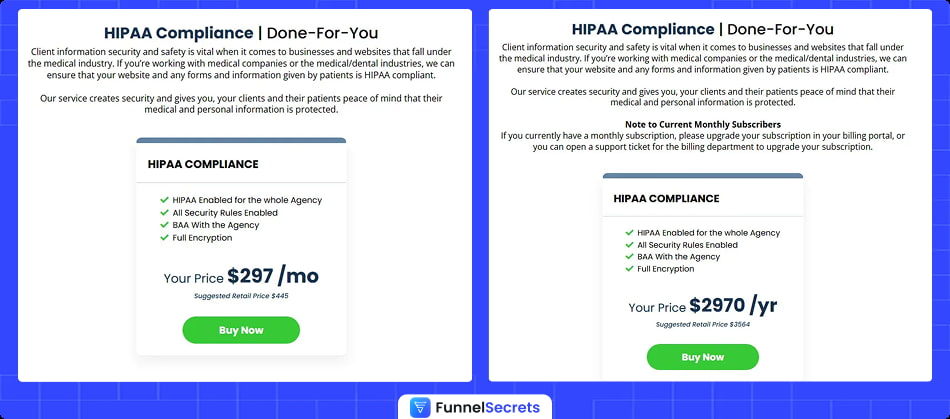
GoHighLevel HIPAA compliance costs $297/month (or $2,970/year) as a separate add-on to your base subscription.
That’s not your total cost. It stacks.
Total monthly costs range from $394/month (Starter + HIPAA) to $794/month (Pro + HIPAA). Not cheap—but cheaper than a HIPAA violation fine. (Those start at $100 per incident and scale to $1.5 million per year.)
The following table shows total monthly costs for GoHighLevel with HIPAA compliance:
| Base Plan | Base Cost | + HIPAA Add-On | Total Monthly |
|---|---|---|---|
| Starter | $97/mo | $297/mo | $394/mo |
| Unlimited | $297/mo | $297/mo | $594/mo |
| Pro | $497/mo | $297/mo | $794/mo |
| Annual HIPAA | — | $2,970/yr | Saves ~$594 |
The annual option saves you roughly two months of fees. If you’re committed to healthcare clients long-term, that’s an easy $594 back in your pocket.
Before you buy, know these financial realities:
- The HIPAA add-on is in addition to your base subscription. It’s not a replacement plan
- Once enabled, HIPAA cannot be canceled, refunded, removed, or downgraded
- The fee is permanent. You pay it for the lifetime of your account
- Applies to your entire agency and all sub-accounts. No picking and choosing which locations get HIPAA
- Canadian users pay ~30% more due to currency conversion.
That second point deserves repeating. This isn’t like adding a Spotify premium feature you can drop next month.
Once you click buy, you’re locked in. Make sure you actually have healthcare clients (or solid prospects) before committing $297/month to a feature you can’t undo.
What HIPAA Features Does GoHighLevel Include?
GoHighLevel’s HIPAA package includes 6 key security features: 256-bit AES encryption, automatic data protection, Business Associate Agreement, Multi-Factor Authentication enforcement, comprehensive audit logging, and role-based access controls.
Let’s break down what you’re actually getting.
1. 256-bit AES Encryption
Sleep better knowing patient data is locked in a digital vault that hackers can’t crack.
This is the same encryption banks use to protect millions. Every patient name, phone number, and health record gets scrambled into unreadable code before it ever touches a hard drive.
The best part? You don’t configure anything. Zero setup. Zero technical headaches.
The moment you enable HIPAA, encryption happens automatically in the background. Patient texts, emails, form submissions—all protected without you lifting a finger.
(That’s one less thing keeping you up at night.)
2. Business Associate Agreement (BAA)
Your legal shield if something ever goes wrong.
Without a signed BAA, you’re operating naked. One data breach, one complaint, one audit—and YOU absorb all the liability. That’s a business-ending risk most agencies don’t realize they’re taking.
GoHighLevel’s BAA puts their name on the line alongside yours. They legally commit to protecting patient data. If they fail, they share the consequences.
Sign it directly inside the app. No lawyers. No waiting. No chasing down compliance departments.
Download a copy for your records. Your healthcare clients will ask for proof—now you have it.
3. Multi-Factor Authentication (MFA) Enforcement
Stop hackers at the door—even when passwords get stolen.
Here’s a scary truth: 81% of data breaches start with stolen passwords. Your team reuses passwords. (Everyone does.) One phishing email, and a hacker has the keys to patient data.
MFA changes the game.
Even with your password, attackers can’t get in without the 6-digit code from your phone. It refreshes every 30 seconds. Completely useless to anyone who doesn’t physically hold your device.
Works with Google Authenticator, Microsoft Authenticator, or Authy. Ten backup codes are provided if you lose your phone.
(This single feature blocks most breach attempts. Hackers HATE it.)
4. Comprehensive Audit Logging
If something goes wrong, you’ll know exactly who did what—and when.
Imagine this nightmare: A patient complains about leaked information. Your client demands answers. An auditor shows up asking questions.
Without audit logs, you’re guessing. Pointing fingers. Looking incompetent.
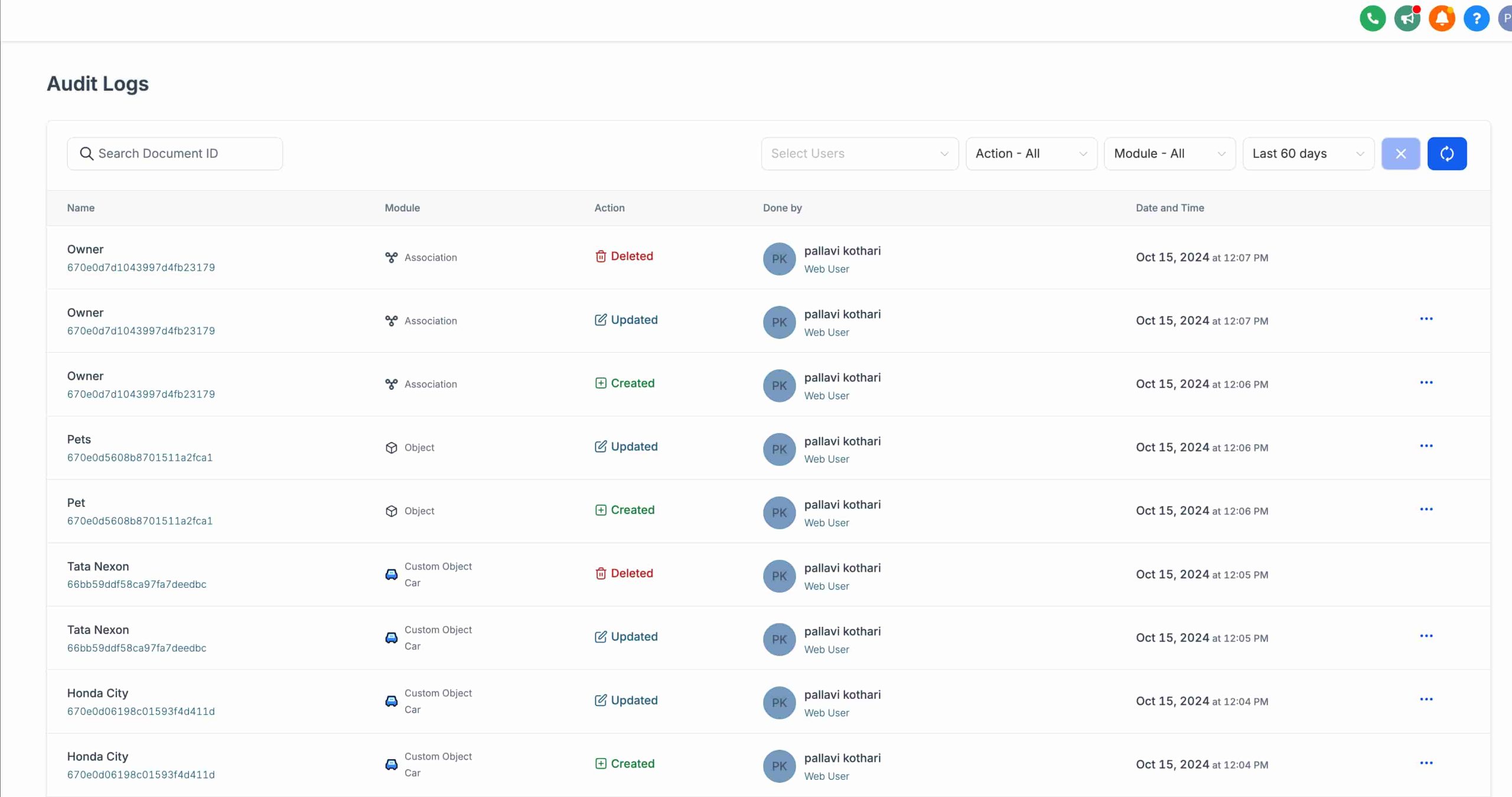
With audit logs, you pull the receipts in seconds:
- Exactly who accessed that patient’s record
- The precise date and time
- What action they took (viewed, edited, deleted)
- Every detail documented automatically
Export reports when auditors come knocking. Prove your compliance with hard evidence, not promises.
(This is your “get out of jail free” card when things get messy.)
5. Role-Based Access Controls
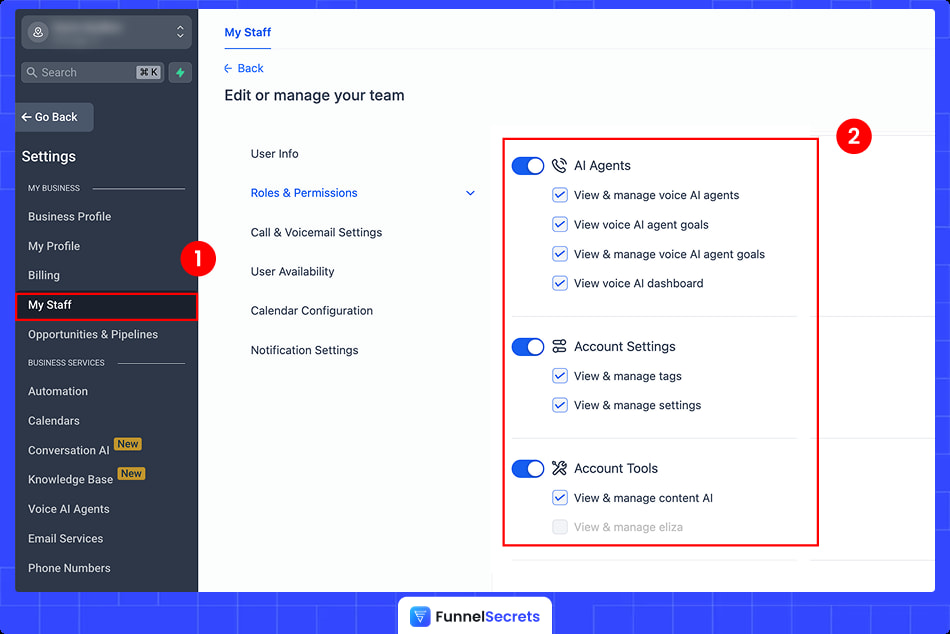
Your receptionist doesn’t need access to everything. Now they won’t have it.
Every unnecessary access point is a potential breach waiting to happen. The intern checking appointment times doesn’t need to see medical histories. The billing person doesn’t need full patient contact lists.
Role-based controls let you lock it down tight:
- Assign minimum-necessary permissions by role
- Revoke access instantly when someone leaves
- Audit who can see what—anytime
Think of it like hotel room keys. Everyone gets into the building. But only authorized staff get into the room with the valuables.
Your compliance officer sleeps better. Your patients’ data stays protected.
6. Agency-Wide Enablement
One purchase protects your entire operation—automatically.
Here’s what makes this simple: buy once, and every sub-account under your agency gets HIPAA protection. Current clients. Future clients. No extra setup per location.
No gaps. No “oops, I forgot to enable HIPAA on that account.” No compliance holes waiting to bite you.
For healthcare-focused agencies, this is actually a benefit—you can’t accidentally leave a client unprotected. For agencies with mixed clientele, factor this into your decision before purchasing.
Everything is protected from day one. That’s the peace of mind you’re paying for.
These features collectively address the Technical Safeguards required under 45 CFR § 164.312 of the HIPAA Security Rule. That’s the specific federal regulation governing electronic PHI protection—and GoHighLevel checks those boxes.
What Data Types Are Protected Under GoHighLevel HIPAA?
GoHighLevel’s HIPAA compliance covers all objects that can store PHI, including contacts, notes, SMS/MMS messages, voice recordings, emails, form submissions, calendar appointments, invoices, pipelines, and workflow data.
Basically, if patient information can live there, it’s encrypted.
The following data types are encrypted and protected under GoHighLevel’s HIPAA compliance:
- Contacts and contact custom fields: Patient names, phone numbers, addresses, and any custom data you collect.
- Notes attached to contacts: Those internal notes your team adds about patient interactions.
- SMS/MMS messages and conversations: Every text thread, including images
- Voice recordings from calls: Recorded consultations, appointment confirmations, follow-ups.
- Email bodies and attachments: The full message plus any files sent or received.
- Form and survey submissions: Intake forms, health questionnaires, consent documents.
- Calendar appointments and scheduling data: Appointment types, dates, and patient details.
- Invoices and payment information: Billing records tied to patient accounts
- Pipeline and opportunity data: Patient journey tracking through your sales process
- Workflow and automation data: Any PHI flowing through your automated sequences
That last one matters more than people realize. (Automations touch everything.)
If your workflow sends appointment reminders with patient names, that data is protected. If it triggers follow-up emails after procedures, those are protected too. The encryption follows PHI wherever it moves inside the platform.
What about the mobile app?
The GoHighLevel mobile app—Conversations, Calendars, and Contacts—inherits the same encryption and MFA controls as the web platform.
No separate setup. No weaker security on your phone. Your team can respond to patients from anywhere without creating compliance gaps.
How to Enable HIPAA Compliance in GoHighLevel
To enable HIPAA compliance, you’ll need a GoHighLevel account. If you don’t have one yet, click here to get a GoHighLevel 14-day free trial.
Follow these 5 steps to enable HIPAA compliance in GoHighLevel:
Step 1: Navigate to Compliance Settings
Log in to your GoHighLevel agency account, click on Settings in the left sidebar.
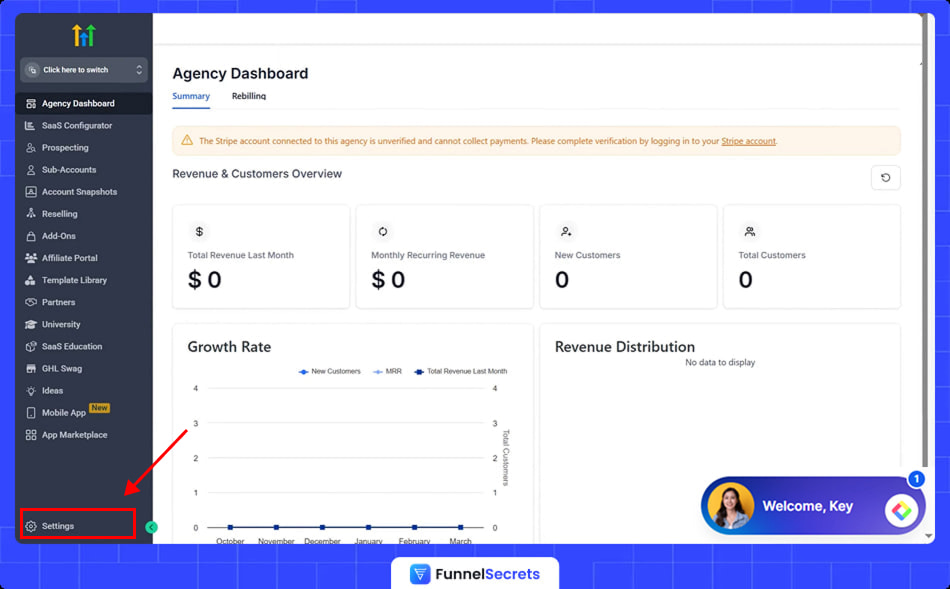
Select Compliance from the menu.
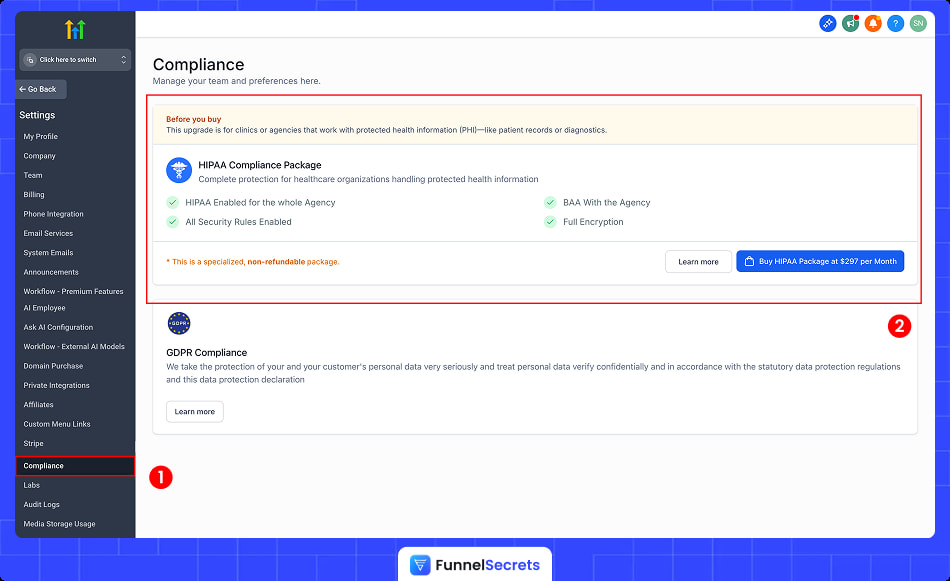
You’ll land on the HIPAA compliance purchase page. Simple enough.
Step 2: Review Requirements
This is where most people scroll too fast. Don’t.
- Read ALL the “Before You Buy” details carefully
- Understand that HIPAA cannot be canceled once enabled
- Review features and acknowledgment requirements
GoHighLevel makes you read and accept several disclosures. (They’re protecting themselves—and honestly, protecting you from an impulse buy you can’t undo.)
Step 3: Purchase the Add-On
Time to commit.
- Click “Buy HIPAA Package at $297 per Month”
- Review the note, features, and acknowledgment box one more time
- Check the acknowledgment box confirming you understand the permanent nature
- Click “Pay $297 & Subscribe.”
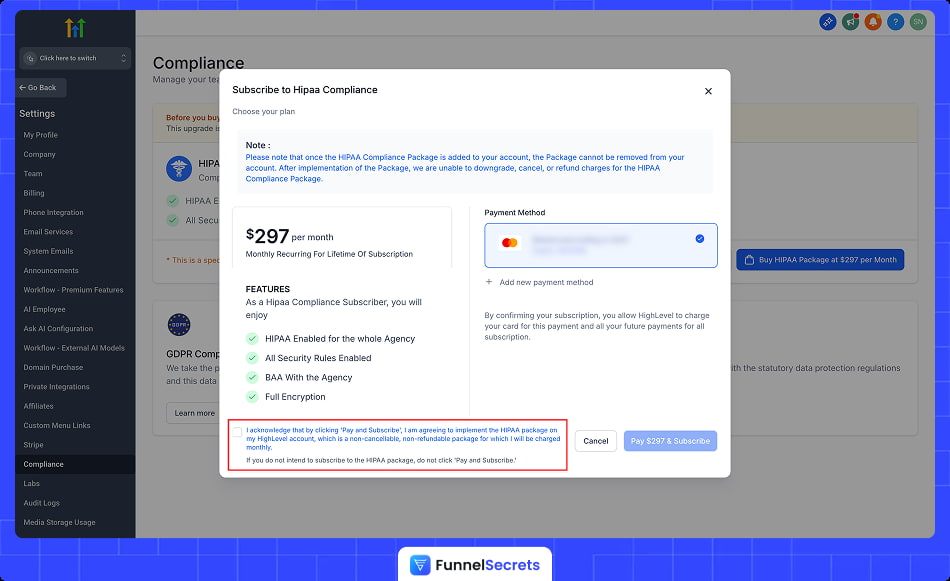
Your card gets charged immediately. No going back after this click.
Step 4: Sign the Business Associate Agreement
Right after your payment processes, you’ll see a signing prompt.
- Click “Sign Now” when it appears
- Sign the BAA document directly within the app
- Download a copy for your records
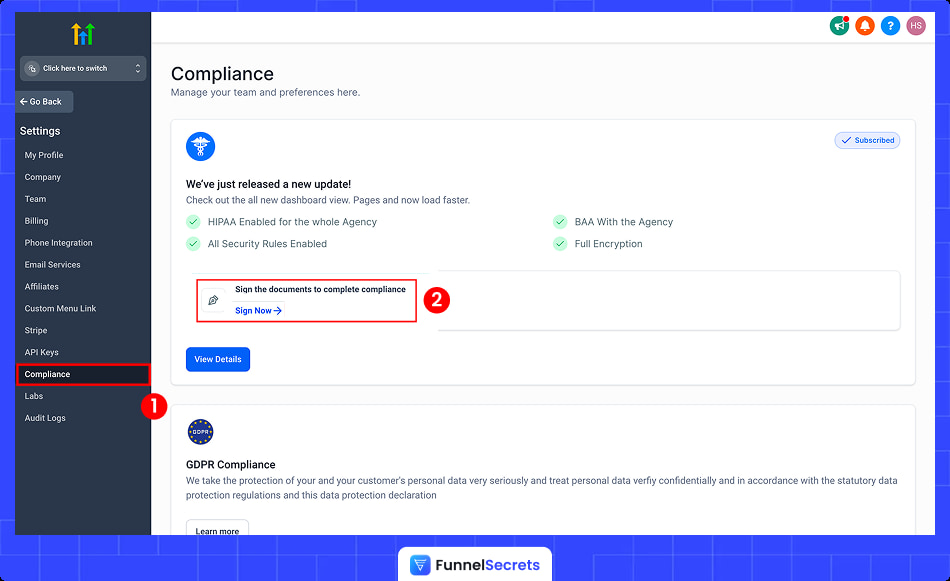
The faster you sign, the faster activation happens. Don’t leave this sitting in your dashboard for a week.
Step 5: Wait for Activation
You’re done clicking. Now, GoHighLevel does their part.
- HIPAA features typically activate within 48-72 hours
- You’ll receive a confirmation email once activation completes
- All data encryption happens automatically in the background
No configuration needed on your end. Once you get that confirmation email, your account is fully protected. Every contact, every message, every form submission—encrypted.
What Healthcare Professionals Can Use GoHighLevel?
Healthcare professionals who can use GoHighLevel with HIPAA compliance include medical practices, dental offices, chiropractic clinics, mental health therapists, health coaches, medical spas, physical therapists, and telehealth providers.
Pretty much anyone handling patient data. If you’re billing insurance or collecting health information, GoHighLevel can work for you.
Patient Communication Management
No-shows are bleeding your revenue dry.
The average practice loses $150,000+ annually to missed appointments. (Not a typo.)
GoHighLevel fixes this with automated reminders via SMS and email—all encrypted, all compliant.
Patient books Monday. Gets a text reminder Friday. Another nudge Sunday night. Confirmation Monday morning with your address and “reply to reschedule” option.
You didn’t lift a finger. Your front desk didn’t dial a single number.
The payoff? Practices using automated reminders cut no-shows by 30-40%. That’s $45,000-$60,000 back in your pocket.
Plus, two-way messaging kills phone tag forever. Patients text questions. You respond in seconds. Everyone’s happy.
(Your receptionist might actually eat lunch for once.)
Marketing & Patient Acquisition
Empty chairs don’t pay bills. Full schedules do.
Here’s the brutal truth: Most practices are TERRIBLE at marketing. You mastered medicine—not Facebook ads. So your waiting room stays half-empty while the mediocre clinic down the street books solid.
GoHighLevel levels the playing field.
Run Facebook ads that capture leads directly into your CRM. Build landing pages for new patient specials—no developer needed. Send HIPAA-compliant email campaigns to reactivate patients who ghosted you six months ago.
Example: Chiropractor runs “$49 First Visit” ad. Someone clicks, fills form, and automatically enters a 5-email nurture sequence. By email three, they’re calling to book.
No marketing degree required. Just plug-and-play templates that actually convert.
(Finally compete with the big guys.)
Appointment Scheduling
Calendar chaos ends here.
Your front desk juggles calls, sticky notes, and that ancient booking system from 2009. Double-bookings happen. Patients wait. Everyone’s frustrated.
GoHighLevel’s online booking changes everything.
Patients see real-time availability. Pick their slot. Book instantly. Done.
No phone calls. No “let me check with the doctor.” No back-and-forth emails finding a time that works.
The system automatically prevents double-bookings. (Finally.) Sends confirmation immediately. Syncs with your existing calendar.
The transformation? Your front desk stops drowning in scheduling calls. Patients book at 11 pm when it’s convenient for THEM. You wake up to a full calendar.
That’s not just efficiency. That’s freedom.
Practice Management
Your command center for patient relationships.
Scattered spreadsheets. Sticky notes everywhere. Patient info in three different systems. Sound familiar?
GoHighLevel centralizes everything into one dashboard.
Every patient interaction—calls, texts, emails, appointments, forms—lives in one place. Click a name, see their entire history. No digging through files. No “which system was that in again?”
Pipeline tracking shows exactly where each patient sits in their journey. New lead? Follow-up needed? Ready to book? You see it instantly.
Integrates with your existing EHR and billing software. No ripping out what already works.
Think of it like mission control for your practice. One screen. Total visibility. Zero chaos.
(Your future self will thank you.)
Healthcare Types That Benefit Most
Who gets the biggest wins from GoHighLevel?
- Medical practices and physicians — Automate follow-ups, reduce no-shows
- Dental offices and orthodontists — Fill cancellation slots instantly via SMS
- Mental health professionals — Secure messaging for sensitive communications
- Chiropractors and physical therapists — Nurture injury leads into long-term patients
- Health and wellness coaches — Scale 1-on-1 communication without burning out
- Medical spas and aesthetic clinics — Promote seasonal specials, reactivate past clients
- Telehealth providers — Centralize virtual patient communication in one platform
Notice the pattern? Any practice needing to communicate with patients, book appointments, and manage relationships fits perfectly.
Bottom line: If patient data touches your business, GoHighLevel (with HIPAA enabled) handles the heavy lifting while you focus on what you actually went to school for—helping people get healthy.
What Are the Limitations of GoHighLevel HIPAA Compliance?
The HIPAA add-on doesn’t cover everything. There are missing features. Gaps that might frustrate you if you’re expecting a full-blown medical practice management system.
These limitations are workable IF you know what they are upfront. No surprises. No “why can’t I do this?” moments after you’ve already committed.
Let’s break down exactly where GoHighLevel falls short—so you can decide if it fits your practice.
1. High-Pricing, Permanent, and Non-Refundable (Read This Twice)
The HIPAA add-on costs $297/month ($3,564/year) or $2,970/year paid annually. This stacks ON TOP of your base subscription.
Note: Once enabled, HIPAA cannot be canceled, refunded, removed, or downgraded. Ever.
Starter plan + HIPAA = $394/month. That’s $4,728/year locked in FOREVER.
For small agencies, this math is crushing.
One dental client doesn’t justify $297/month. Your profit margin vanishes before you cash your first check. (And there’s no escape hatch.)
Here’s a smarter approach (if possible):
Use GoHighLevel for marketing only. Capture leads. Send appointment reminders with names and times. Names alone aren’t PHI.
Once someone becomes an actual patient, hand them off to your client’s existing EHR system.
You stay in the marketing lane. Their clinical system handles protected data. No permanent $297/month commitment needed.
2. Deleted Contacts Are Gone Forever (No Recovery Option)
This one’s scary. Take a breath.
Standard GoHighLevel accounts let you restore deleted contacts within 60 days. Accidentally nuke a client list? No problem—just recover it.
HIPAA accounts don’t have this safety net.
Delete a contact and it’s gone. Permanently. No 60-day grace period. No support ticket that magically brings it back. That patient data vanishes into the void.
(Imagine explaining to your healthcare client that you accidentally deleted 500 patient contacts. Permanently. Yeah.)
But here’s how you protect yourself:
Export your contact data regularly. Weekly at minimum. Monthly exports aren’t enough when you’re handling irreplaceable patient information.
Create a backup ritual. Put it on your calendar. Treat it like brushing your teeth—boring but non-negotiable.
This limitation is manageable with discipline. Just don’t learn about it the hard way.
3. Not a Replacement for Your EHR/EMR
Let’s be crystal clear: GoHighLevel is NOT a medical records system.
It won’t replace your EHR. It’s not designed to. And trying to force it into that role is asking for trouble.
What belongs in your EHR (not GoHighLevel):
- Detailed medical records and patient histories
- Clinical notes and treatment documentation
- Diagnosis codes and lab results
- Prescription information
What GoHighLevel actually excels at:
- Patient communication (texts, emails, reminders)
- Appointment scheduling and confirmations
- Marketing campaigns and lead generation
- Follow-up sequences and reactivation
Think of GoHighLevel as the front door. It gets patients IN. Your EHR handles what happens once they’re sitting in the exam room.
(Trying to use GoHighLevel as your clinical system is like using a hammer to screw in a lightbulb. Wrong tool, messy results.)
Keep them separate. Let each tool dominate what it’s built for.
HIPAA compliance is just one piece of the GoHighLevel puzzle. Before committing to the $297/month add-on, you need to know if the platform itself fits your business.
Does it actually deliver on its promises? Is the learning curve manageable?
I break down everything—pricing tiers, features, pros, cons, and honest verdict—in my complete GoHighLevel honest review.
Frequently Asked Questions About GoHighLevel HIPAA Compliance
Got questions? You’re not alone. These are the most common ones we hear.